


Easy Homescreen
4.026.82K Reviews
App Specs
- Version
- 1.10.29
- Updated On
- License
- Free
- Downloads
- 10,000,000+
- Developer
- Homescreen Apps
- Categories
- Personalization
- Platform
- Android
Screenshots
 Analysis by AppCompare
My starting point with a home-screen organizer is usually a familiar one: I know the apps I use, but reaching them means swiping past clutter or searching through folders I set up and then forgot. I tried Easy Homescreen as a way to make the first screen feel more deliberate, rather than as a full phone makeover. Its focus is practical personalization—changing how shortcuts and icons are presented, and making everyday choices easier to reach.
From a crowded screen to a working layout
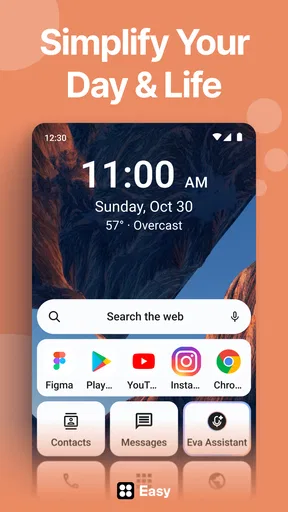
I would begin by deciding what I actually need within one tap: perhaps messaging, maps, a calendar, and the camera. That small audit matters more than choosing a theme first. If I move every app onto the front page, I have only recreated the clutter in a different style. A simpler arrangement gives each shortcut a reason to be there and makes the screen easier to scan when I am in a hurry.
The app is a free personalization app from Homescreen Apps, with optional in-app purchases ranging from $0.99 to $29.99 per item. Its release date was January 26, 2023, and version 1.8.37 lists Android 9 as the minimum operating system. That makes it relevant to a broad range of Android users, although the right experience still depends on the phone and the system settings available on it.
When setting up a layout, I would make one change at a time and check how it feels in ordinary use. Put the most-used shortcuts where your thumb naturally lands, then leave the phone alone for a day before adding more decoration. This is a useful trade-off: a restrained screen may look less dramatic in a screenshot, but it is often faster to use than a crowded design packed with icons and visual flourishes.
Making personalization serve a real routine
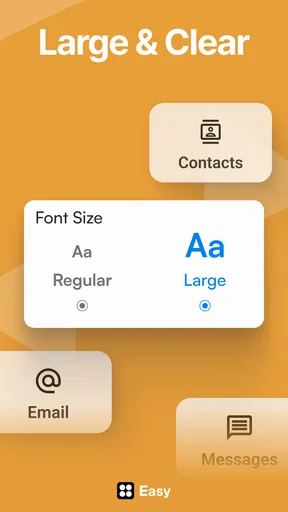
Fonts and icons can make a screen feel more personal, but readability should come first. I would choose a style that keeps app names easy to recognize and distinguishable icons easy to pick out at a glance. A striking look is not much help if it makes a familiar shortcut harder to identify. For someone who uses a phone while walking between appointments or carrying groceries, clarity is more valuable than a perfectly coordinated palette.
A practical example is getting ready for a commute. I might want navigation, transit or ride information, music, and messages close together. Rather than trying to rebuild the whole phone, I would arrange the shortcuts I reach for during that routine, then keep less-used apps out of the way. On a different day, the same screen can still serve other needs; the point is to reduce needless hunting, not to create a rigid setup that only works in one situation.
Shortcuts are most useful when they remove a repeated step. Before adding one, I would ask whether I use that destination often enough to justify the space it takes. If I rarely open an app, leaving it in the broader app list may be cleaner than making it a permanent fixture. That small bit of editing is one of the easiest ways to stop a customization project from turning into another source of clutter.
Worth Reading Before You Choose

EA SPORTS FC Mobile 26 Is a Bigger Football Game, but It Takes Time

Flipboard Shows What News Apps Must Do Beyond the Feed

Switching to Android Auto Means Rethinking Your Driving Routine

Google Calendar Makes a Crowded Week Easier to Manage

Ludo King Makes the Most of the Minutes Between Plans

Baby Panda World Brings Quick Play to Modern Phones, but Its Game Library Feels Busy
Where it sits among Android home-screen options
Compared with leaving the phone’s default home screen untouched, a dedicated personalization app is appealing when the standard arrangement feels too limiting or visually busy. Compared with a more elaborate launcher, Easy Homescreen’s straightforward focus may suit someone who wants to adjust the basics without turning home-screen design into a hobby. I would not assume that every Android launcher offers the same tools or behaves identically, so users who depend on a particular layout or advanced control should check that their preferred setup is available before committing to a switch.
The key question is how much control you want. If your main goal is to make common apps easier to reach and give icons or text a more personal look, this approach is a sensible place to start. If you enjoy fine-tuning every part of a launcher, or rely on a highly specific arrangement, a more configurable alternative may be a better fit. Likewise, if your current screen already feels clear and fast, changing it just for novelty may not improve your day.
One useful workflow is to take note of your existing arrangement before experimenting. Keep track of which apps are in the places you depend on, make a modest change, and test it through your usual routine. If the new layout slows you down, restore the familiar order rather than layering more tweaks on top. This makes experimentation reversible and helps separate genuinely useful changes from ones that only look appealing at first.
Getting to Know Easy Homescreen
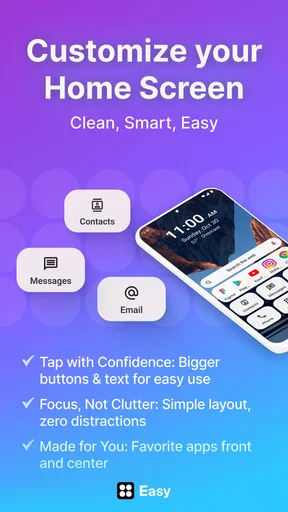
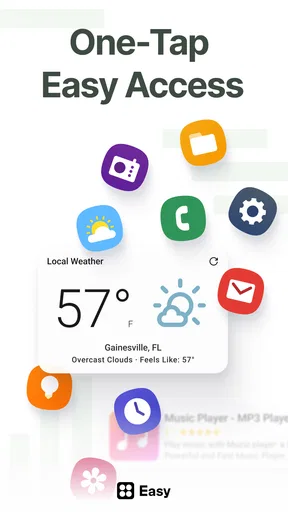
So, what's the big deal about Easy Homescreen? In a nutshell, it's a customizable launcher app designed to help you organize your apps, widgets, and shortcuts in a way that makes sense to you. Whether you're a minimalist or a power user, this app promises to streamline your smartphone usage.
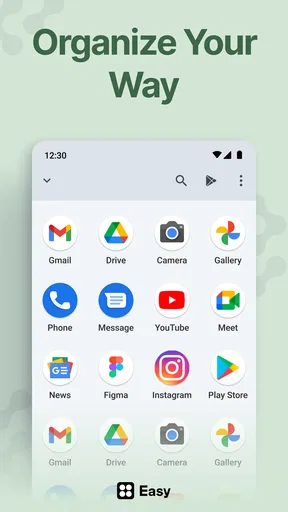
Setting it up is a breeze. Right off the bat, you're greeted with a clean, intuitive interface. It almost feels like your phone is giving you a friendly handshake, inviting you to take control. You can drag and drop apps into folders, customize widgets, and even change themes to match your mood. The level of personalization is pretty impressive.
Features That Shine
One of my favorite features is the smart folder system. If you're like me, you probably have a zillion apps that you barely use. With Easy Homescreen, you can easily categorize these apps into folders, making them much easier to find. And hey, your home screen will finally look like a work of art!
Another cool feature is the gesture support. You can set up specific gestures to launch apps or perform actions. For example, a simple swipe up could open your email, while a double-tap might bring up your music player. It's like having your own personal assistant at your fingertips.
And let's not forget about the custom themes. Whether you want a sleek, professional look or a vibrant, funky vibe, there's a theme for every personality. Plus, the app's library is constantly updating, so there's always something fresh to try out.
Why You'll Love It
Honestly, the real charm of Easy Homescreen lies in its ability to adapt to your lifestyle. It's like having a tailor-made suit for your phone. You save time, reduce clutter, and get to enjoy a phone that truly feels like yours.
The app also performs smoothly without draining your battery, which is a huge plus in my book. After all, who wants to sacrifice battery life for a pretty interface?
What to expect before you settle in
A few practical questions shape whether I would keep a home-screen app installed. First, is it free to try? Yes: it is listed as free, though in-app purchases are available. I would explore the basic arrangement before buying anything and decide whether a paid item solves a specific problem for me, rather than paying simply because I am still browsing styles.
Second, is it suitable for a family phone or a device used by someone who prefers a simple interface? Its content rating is Everyone, but suitability in daily use is also about the layout. I would keep the most important shortcuts obvious, avoid decorative choices that reduce legibility, and let the person who uses the phone test the arrangement themselves. A tidy screen is only successful if its owner can navigate it comfortably.
Third, does it make sense to change the home screen if I only want a different wallpaper? Probably not. A wallpaper-only change is the lighter option when the existing icons and shortcuts already work well. This app makes more sense when the issue is the arrangement or presentation of the home screen, not when I have one isolated cosmetic preference.
The user community is substantial: the app has an average rating of 4.0 from around 244,000 ratings, with roughly 19,000 written reviews and over 10 million installs. I take that as a sign that many people have tried it, not a guarantee that every phone or personal workflow will suit it. The most useful test is still whether I can find my own frequently used apps more easily after setting it up.
When the handoff or setup becomes friction
Customization can involve more than choosing how a screen looks. A changed home-screen arrangement may take a little adjustment because the old muscle memory still points to the previous locations. I would avoid redesigning everything just before a busy day. Make the change when there is time to test it, and keep the first version simple enough that you can tell whether it helps.
There is also a difference between a shortcut that saves a step and one that adds another decision. If a screen has too many folders, gesture choices, or visual treatments, I may spend longer remembering where I put something than I did finding it before. The best result is not the most customized one; it is the arrangement I can use without thinking. For that reason, I would add features gradually and remove any that do not earn their place.
It is worth remembering that this is an Android-focused choice: the listed minimum operating system is Android 9. If you use a phone on an older system, it is not the right option for that device. And if your priority is a highly specialized launcher workflow, I would compare the available controls carefully rather than assuming a personalization-focused app will replace every tool in a more advanced alternative.
Who will get the most from it
I would recommend trying it if you regularly lose time swiping through screens, want app shortcuts arranged around a daily routine, or enjoy a more personal look without needing to start from scratch. It can also be useful for someone helping a relative simplify a phone, provided that person gets to choose and test the final layout. In both cases, the payoff comes from deliberate placement rather than from changing every available detail.
I would skip it if your current home screen is already easy to navigate, if you are happy with only changing wallpaper, or if you need a specific advanced behavior that you have not confirmed it supports. I would also be cautious about making a large visual overhaul for someone else: what looks neat to me may not be easy for them to recognize. A small, familiar arrangement often beats an ambitious redesign.
As an app in the personalization category, Easy Homescreen is best judged by the practical result it creates on the first screen you see every day. Its free entry point makes it approachable, while purchases are something to weigh only after you know what you want from it. I would start with a short list of essential apps, arrange them for the way I actually use my phone, and give the setup a few ordinary days before deciding whether to keep refining it.
Wrapping It Up
So, is Easy Homescreen worth a shot? Absolutely! It's user-friendly, packed with features, and gives you the power to customize your phone exactly how you want it. Whether you're organizing your apps for productivity or just want a visually appealing layout, this app has got you covered.
Ready to take control of your smartphone experience? Give it a try and watch your phone transform into a masterpiece of efficiency and style. You won't regret it!
Pros
- Intuitive and user-friendly interface.
- Highly customizable layout options.
- Quick access to favorite apps.
- Efficient battery usage.
- Frequent updates with new features.
Cons
- Limited widget support.
- Occasional app crashes.
- Ads in the free version.
- No offline mode available.
- Requires Android 9.0 or later.
FAQs for Easy Homescreen
What is Easy Homescreen and how does it work?
Easy Homescreen is a customizable launcher app designed to simplify the user interface of your Android or iOS device. It allows you to personalize your home screen with widgets, icons, and themes, providing a more intuitive and efficient experience. Users can easily access their favorite apps and features directly from the homescreen.
Is Easy Homescreen compatible with all devices?
Easy Homescreen is compatible with most Android and iOS devices. However, some older models may not support all features due to hardware limitations. It is recommended to check the app’s compatibility on the app store or the developer’s website before downloading to ensure it works with your specific device.
Does Easy Homescreen affect device performance?
Easy Homescreen is designed to be lightweight and efficient, minimizing its impact on device performance. While it should not significantly slow down your device, it is always good practice to monitor performance after installation, especially on older devices, to ensure a smooth experience.
Can I customize the themes and widgets in Easy Homescreen?
Yes, Easy Homescreen offers extensive customization options. Users can choose from a variety of themes and widgets to tailor the homescreen to their liking. These features enable you to create a unique and personalized interface that suits your style and needs.
Is there a cost associated with using Easy Homescreen?
Easy Homescreen is available as a free download, but it may offer in-app purchases for additional features or premium content. These purchases can include exclusive themes, widgets, or ad-free experiences. Users can choose whether to purchase these extras based on their preferences and requirements.


